


UTM codes are small pieces of text added to URLs that help track where your website traffic is coming from, which channels are performing best, and how users interact with your content. UTM codes, short for Urchin Tracking Module, work seamlessly with tools like Google Analytics to provide detailed insights into your campaigns.
Key Takeaways:
- Purpose: UTM codes identify traffic sources and help measure marketing efforts.
- Core Parameters:
utm_source,utm_medium,utm_campaign(essential), plusutm_termandutm_contentfor deeper tracking. - Use Cases: Social media, email, paid ads, and offline marketing (like QR codes).
- Best Practices: Use lowercase, maintain a consistent naming convention, and avoid using UTMs on internal links.
UTM codes are critical for understanding which campaigns drive results, optimizing your marketing spend, and improving ROI. By tagging your links properly, you gain actionable data to refine your strategies.
Google Analytics UTM Tracking Tutorial: Step by Step [Free Template Download]
The 5 UTM Code Parameters Explained
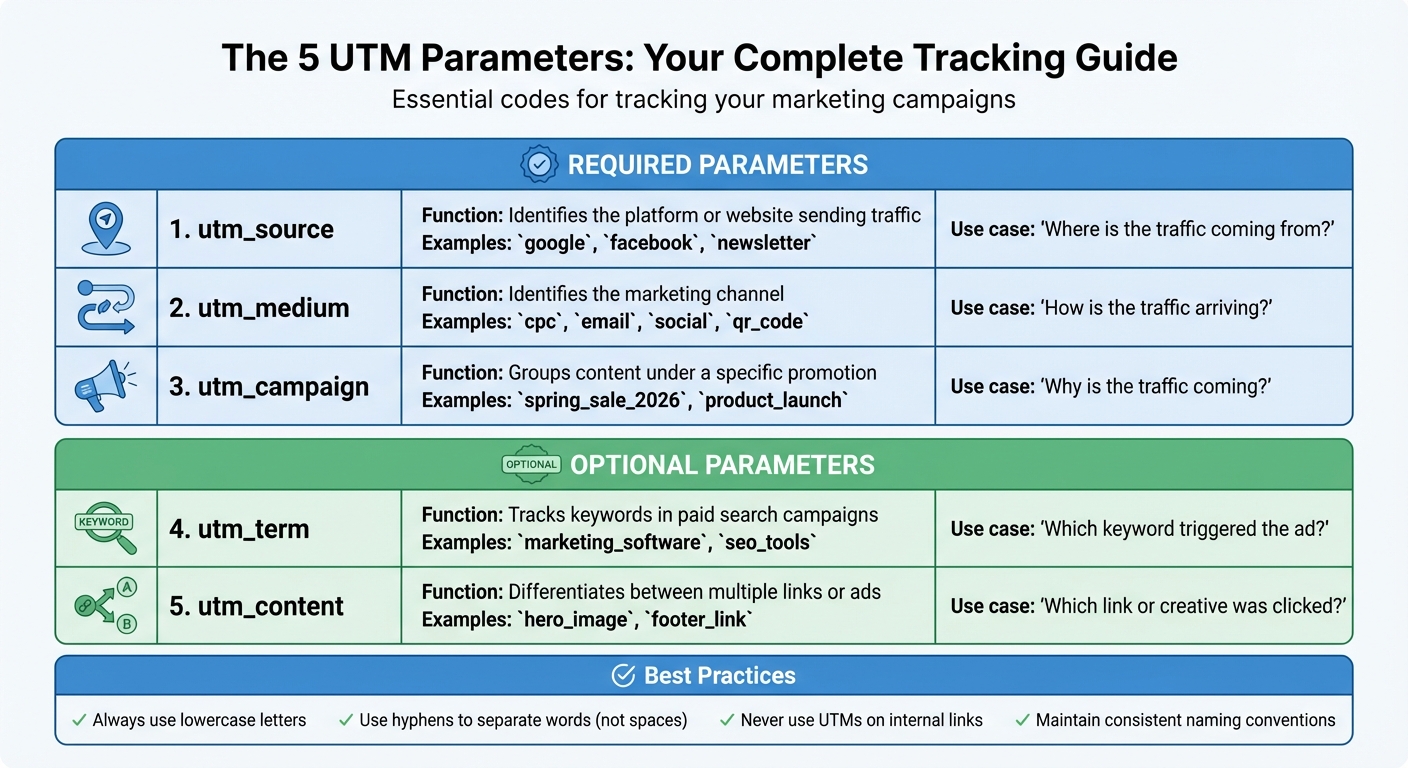
UTM Parameters Guide: 5 Core Tracking Codes Explained
The 5 Core UTM Codes Parameters
UTM codes are made up of five parameters, each serving a specific purpose for tracking your marketing campaigns. The key parameters include utm_source, which identifies the platform or website driving traffic (like facebook, google, or monthly_newsletter); utm_medium, which specifies the channel being used (such as email, cpc, or social); and utm_campaign, which groups all efforts under a single campaign name (e.g., spring_sale_2026 or product_launch).
The other two – utm_term and utm_content – offer more granular tracking. utm_term is commonly used in paid search campaigns to track specific keywords or phrases (like marketing_software or running_shoes). On the other hand, utm_content helps differentiate between multiple links pointing to the same destination. This is especially useful for A/B testing creatives or placements, such as comparing a hero_button to a footer_link.
While you can use all five parameters, the first three – utm_source, utm_medium, and utm_campaign – are the essentials for basic tracking. Adding utm_term and utm_content can provide more detailed insights, especially for testing variations or analyzing paid search performance.
“UTM parameters in a URL identify the marketing campaign that refers traffic to a specific website.” – Wikipedia [5]
Keep in mind that UTMs are case-sensitive. For example, Social and social are treated as entirely different by analytics tools, which can lead to fragmented data. Also, Google Analytics defaults to attributing a session to a specific campaign for six months, meaning your UTM data can influence attribution long after the initial click [5].
When to Use Each UTM Code Parameter
Now that we’ve covered the basics, let’s look at how to apply each parameter effectively. The choice of parameters depends on your marketing channel and what you’re aiming to track.
For email campaigns, always use utm_medium=email and take advantage of utm_content to distinguish between different links within the same email – like header links, buttons, or text links.
On social media, use utm_source to specify the platform (e.g., instagram or linkedin) and utm_medium to separate organic from paid posts (e.g., social_organic versus social_paid). When running paid search campaigns, utm_term becomes crucial as it tracks the specific keywords triggering your ads. For offline campaigns, like QR codes on flyers or magazine ads, using qr_code or print as utm_medium transforms otherwise untraceable “Direct” traffic into measurable campaign data.
“The key to accurately analyzing your social media marketing efforts with UTM codes is consistency.” – Jeffrey Kranz [4]
One critical rule: never use UTM codes for internal links on your website. Doing so resets the user’s session and overwrites the original attribution data, making it impossible to track where visitors originally came from. Each parameter has a specific role, and using them correctly ensures accurate insights into your marketing efforts.
UTM Parameters Reference Table
| Parameter | Function | Example Values |
|---|---|---|
utm_source |
Identifies the platform or website sending traffic | google, facebook, newsletter |
utm_medium |
Identifies the marketing channel | cpc, email, social, qr_code |
utm_campaign |
Groups content under a specific promotion | spring_sale_2026, product_launch |
utm_term |
Tracks keywords in paid search campaigns | marketing_software, seo_tools |
utm_content |
Differentiates between multiple links or ads | hero_image, footer_link |
To avoid data inconsistencies, always use lowercase letters for all UTM parameters. It’s also a good idea to maintain a shared spreadsheet for your UTM links. This helps your team stick to consistent naming conventions and keeps your analytics reports clean and reliable. Next, we’ll explore how this data integrates with Google Analytics.
How UTM Codes Work with Google Analytics
How UTM Data Reaches Google Analytics
When someone clicks a link containing UTM parameters, the query string – those UTM codes – gets sent directly to Google Analytics without affecting the content of the page.
“Adding these snippets of code after the question mark… doesn’t affect anything on the page – it just lets your analytics program know that someone arrived through a certain source inside an overall marketing channel.” – Ginny Mineo, HubSpot
Google Analytics 4 (GA4) processes this data into dimensions like Session campaign, Session source, and Session medium[3]. This allows GA4 to connect user actions and conversions to specific marketing efforts, such as a particular Facebook ad or a specific link in an email. The process happens automatically, making it easy to analyze and draw insights from detailed data in Google Analytics.
Analyzing UTM Data in Google Analytics
To access your UTM data in GA4, go to Reports > Acquisition > Traffic acquisition[3]. Change the primary dimension to Session campaign to view your utm_campaign data. Then, click the add button next to “Session campaign” and select Session source / medium as a secondary dimension. This will show you the exact platform and campaign responsible for driving traffic.
If you’re testing a new UTM link, the Realtime report is a great tool to confirm your settings. Just make sure to clear your browser cookies before testing so you’re recognized as a new user. You can also use the “Add filter” option to focus on specific mediums – for example, filtering for “exactly matches email” to analyze email performance separately. These tools make it easier to evaluate the effectiveness of your campaigns and adjust your strategy accordingly.
Using UTM Data to Improve Results
UTM data isn’t just for tracking – it can also help you optimize your marketing efforts. By connecting tagged URLs to conversions in Google Analytics, you can assign dollar values to campaigns and identify which channels deliver the best return on investment. For instance, you might discover that email traffic has an 8% conversion rate, while a struggling campaign only converts at 2%[3]. This insight allows you to shift resources toward channels that perform better.
You can also use utm_content for A/B testing. Experiment with different messaging, call-to-action styles, or visuals to see what resonates most with your audience. UTM tracking even helps you create highly targeted audience lists for remarketing in paid media campaigns. To maintain clean and reliable data, use a shared spreadsheet or a UTM manager to standardize naming conventions – like sticking to lowercase letters – to avoid fragmented results in GA4. These practices ensure your data remains accurate and actionable.
sbb-itb-16c0a3c
Best Practices for Creating UTM Codes
Creating a Naming Convention
Keeping your UTM tracking consistent is crucial. Since UTM codes are case-sensitive, variations like “email”, “Email”, and “EMAIL” will be treated as separate sources in your reports[3]. This can lead to fragmented data, making it harder to analyze your campaign’s overall performance.
To avoid this, stick to a lowercase-only rule for all UTM parameters. When separating words, use dashes instead of spaces – for example, write summer-sale instead of summer sale[6]. Agree on a standard set of values for each parameter to maintain uniformity. For instance, your team might decide that “Medium” will always include terms like email, social, cpc, or referral. This kind of standardization ensures everyone is consistent when tagging links.
It’s also a good idea to log every UTM link in a shared Google Sheets or Excel file. This shared document acts as a centralized reference point, much like a style guide for your brand, helping to prevent duplicate codes or conflicting terms. This consistency is a key part of writing for SEO optimization across all your marketing channels.
By following these naming conventions, you’ll reduce confusion and ensure your tracking remains clean and accurate.
Common UTM Codes Mistakes to Avoid
One major error is using UTM codes on internal links – those that direct users from one page of your site to another. Doing this restarts the user session in Google Analytics, which can inflate session counts and erase the original referral data[3][9].
Another common mistake is inconsistent naming. For example, if you use “twitter”, “tw”, and “Twitter” to represent the same platform, your data will be unnecessarily split across multiple entries. Similarly, failing to include required parameters like Source, Medium, and Campaign can result in traffic being labeled as “Unassigned” or “(not set)” in your reports.
Long, unshortened UTM URLs can also hurt your click-through rates (CTR). Studies show that branded short links can improve CTR by up to 39% compared to lengthy tracking URLs[10].
“Without proper tracking, marketers are flying without a compass.” – Sam Hollis, Writer & Strategist, Rebrandly[10]
Before launching any campaign, always test your tagged URL. Paste it into a browser and check the “Realtime” report in GA4 to confirm that the campaign name appears correctly. To ensure accurate results, clear your browser cookies first so you’re recognized as a new user.
Tools for Building UTM Codes
Google’s Campaign URL Builder is a free and widely-used tool for creating UTM codes without errors. It helps prevent issues like missing question marks or ampersands that can break your tracking[3]. If you’re a HubSpot user, their Tracking URL Builder is included with Marketing Hub subscriptions, allowing you to tie clicks directly to your CRM data.
For managing multiple links, centralized UTM spreadsheets in Google Sheets or Excel can be a lifesaver. Free templates for these spreadsheets are readily available online. However, as your campaign grows and the number of links increases, these spreadsheets can become cumbersome due to fragile formulas and the lack of automatic URL shortening.
If your team handles more than 20 links per month, you might consider investing in tools like Terminus or Rebrandly. These platforms enforce naming conventions, offer bulk link-building capabilities, and include automatic URL shortening features[9]. While they come with setup costs and fees, they simplify the process and help maintain consistency across your campaigns.
Using UTM Data to Improve Your Marketing
When you integrate accurate UTM tagging with Google Analytics, you unlock a treasure trove of insights that can elevate your marketing strategy. This data helps you fine-tune your campaigns, ensuring every effort counts.
Measuring Campaign Performance
UTM codes allow you to track the effectiveness of each campaign directly in Google Analytics 4. By analyzing tagged traffic, you can calculate precise ROI and figure out which campaigns to expand and which ones need adjustments.
For example, using unique utm_content tags lets you identify which creative elements – like headlines, images, or calls-to-action – are driving the most conversions. This kind of granular data helps you refine future campaigns and focus on what works best[11]. It also lays the groundwork for identifying your top-performing channels, as we’ll explore next.
Finding Your Best Marketing Channels
Beyond evaluating individual campaigns, UTM codes provide clarity on which marketing channels truly deliver results. Instead of settling for vague labels like “Social Media”, you can pinpoint specific platforms such as Facebook, LinkedIn, or even a single influencer’s bio link. By comparing utm_medium (the channel category) with utm_source (the specific platform), you can identify the strategies that yield the best outcomes[2][11].
“UTM parameters solve this problem by providing precise attribution data for every marketing channel.” – Sam Hollis, Writer & Strategist, Rebrandly[10]
UTM data also reveals variations in performance within the same platform. For instance, if your email campaigns convert at 8% but a specific social media campaign lags behind at 2%, you’ve uncovered a weaker area that could benefit from optimization[3]. Additionally, UTM codes can help you compare ad placements – like sidebar banners versus in-content ads – to see which ones drive more conversions. This way, you can allocate your budget where it matters most[11].
Making Better Marketing Decisions
Clear attribution data empowers you to double down on high-performing channels while scaling back on those that underperform[7][10]. The utm_content parameter is especially useful for running A/B tests, allowing you to experiment with different ad copy, call-to-action buttons, visual designs, or offers. This helps you determine what resonates most with your audience[3]. You can even assign unique UTM parameters to track which teams or departments are driving the most traffic[10].
“Using UTM codes in your links is a helpful way to make a connection between emails and other target destinations.” – Seth Giammanco, Principal, Strategy and Technology, Minds On Design Lab[7]
Without proper UTM tracking, you risk misclassifying traffic from apps, emails, or SMS as “Direct” in your analytics. This creates a blind spot, often referred to as “dark traffic”, which can obscure the true sources of your conversions. By tagging your links effectively, you eliminate this ambiguity and gain the clarity needed to make smarter, data-driven decisions[7][10].
Conclusion: Getting Started with UTM Tracking
Key Takeaways
UTM codes are small URL add-ons that answer three critical questions: where your traffic comes from, how it gets there, and why it arrives in the first place [4][1]. By using the five main parameters – Source, Medium, Campaign, Content, and Term – you can track virtually any marketing effort, from email blasts to social media updates [3][12]. These codes take the guesswork out of attribution by directly linking specific campaigns to revenue and ROI, giving you a clearer picture of what’s working and what’s not [3][2].
When it comes to UTM tracking, consistency is king. To avoid confusion and duplicate entries, keep a shared document for your UTM links and stick to a simple naming convention. Use lowercase letters and hyphens to maintain clarity and uniformity [3][12].
“UTM parameters provide extremely valuable insights into your traffic. You can uncover a goldmine of behavioral data to help boost your sales and refine your overall marketing strategy.” – Neil Patel, Co-Founder, NP Digital [12]
Next Steps
To get started, pick a free UTM builder like Google’s Campaign URL Builder or Buffer’s tool to minimize manual errors [4][8]. Then, create a naming convention guide for your team. Keep it straightforward: use lowercase text, separate words with hyphens, and establish standard terms for recurring campaigns [12][3].
Once you’ve set up your UTM structure, test your tagged links in the GA4 Realtime report before rolling out any campaign [3]. After your links go live, focus on connecting UTM data to business results. For example, analyze which sources and mediums drive the most conversions. If your email campaigns show an 8% conversion rate but a specific social media platform lags at 2%, you’ll know where to prioritize improvements [3]. Finally, consider using link shorteners like Bitly to clean up long UTM strings, especially for social media posts where a polished appearance matters [3][12].
FAQs
How can UTM codes help boost marketing ROI?
UTM codes serve as essential tools for tracking how well your marketing campaigns perform. They help pinpoint which sources, mediums, and campaigns are bringing in the most traffic and driving conversions, giving you a clear picture of what’s effective and what needs adjustment.
Armed with this information, marketers can spend budgets more wisely, concentrating on strategies that deliver results while cutting back on areas that don’t. This focused approach not only sharpens decision-making but also boosts your overall marketing ROI.
What mistakes should I avoid when using UTM codes?
When working with UTM codes, even small mistakes can throw off your data and complicate your analytics. A common misstep is inconsistent naming conventions – for example, switching between “Facebook” and “facebook” or including spaces and special characters. These inconsistencies can scatter your data, making it harder to analyze and less reliable. Another pitfall is applying UTMs to URLs that are publicly shared, like blog posts. When those links are shared on other platforms, the tracking data can get misattributed.
To avoid cluttering your analytics, stick to using UTMs on outbound or campaign-specific links. Tagging internal links can create unnecessary noise in your reports. Also, make sure to URL-encode your parameters and test your links to confirm they’re functioning as intended. Keeping your tags clear, consistent, and purposeful will help you maintain clean, accurate data for better reporting.
How do I use UTM codes to run A/B tests effectively?
When running A/B tests with UTM codes, the key is to assign distinct parameters to each version you’re testing. For instance, if you’re comparing two ad creatives, the utm_content parameter can help you differentiate between them. You’d create two URLs with identical UTM parameters, except for one value that separates the versions, like utm_content=version_a and utm_content=version_b.
Distribute each URL to the appropriate audience, ensuring the traffic split matches your test design – typically a 50/50 split. Afterward, tools like Google Analytics can help you track performance by filtering results based on the UTM parameters. By analyzing metrics such as clicks, conversions, or bounce rates, you can determine which version performs better. This method ensures your A/B testing is accurate and rooted in clear data.