


H1 and H2 tags are critical for SEO and user experience. They help organize your content, improve readability, and signal structure to search engines. Here’s the breakdown:
- Title Tags: Found in the
<head>section, they appear in search results and browser tabs. They attract clicks and play a direct role in how to rank higher on Google. - H1 Tags: The main heading on your page, visible to users. It confirms the page’s topic and aligns with search intent.
- H2 Tags: Subheadings that divide content into sections, making it easier to read and navigate.
Key Takeaways:
- Use one Title Tag and one H1 per page for clarity.
- Keep Title Tags under 60 characters to avoid truncation in search results.
- Use multiple H2 Tags to structure your content logically.
- Proper use of H1-H2 hierarchy can boost rankings by 12% and improve user engagement.
A clear heading structure not only enhances SEO but also improves accessibility and readability, helping users and search engines better understand your content.
The Difference Between Title Tags, H1, and H2
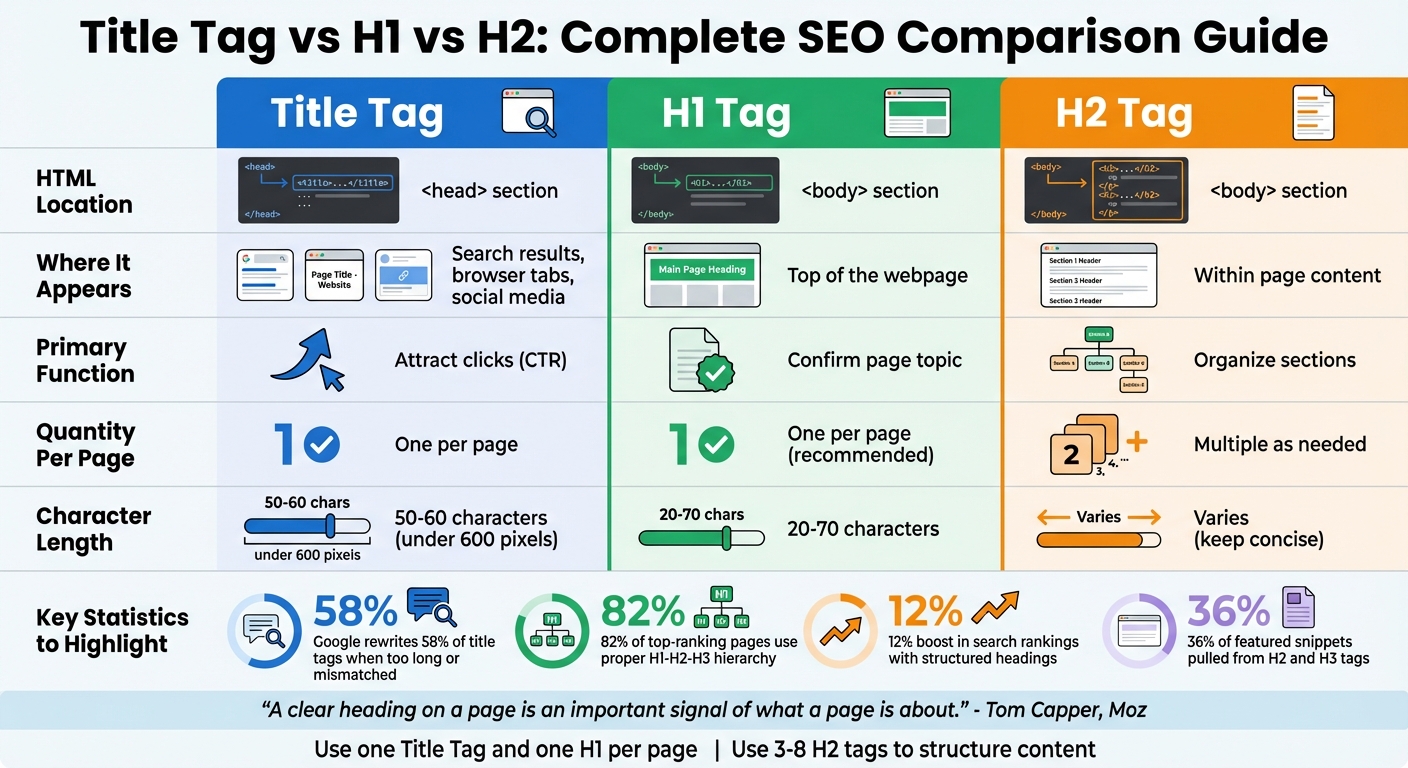
Title Tag vs H1 vs H2: Complete SEO Comparison Guide
Title Tags vs H1 Tags
The title tag, found in the <head> section of your HTML, defines your page’s external identity. It’s what appears as the clickable link in search results, browser tabs, and social media previews. Essentially, it’s your page’s introduction to the world, designed to grab attention and encourage clicks.
On the other hand, the H1 tag lives in the <body> section of your HTML and serves as the visible headline on the page itself. It’s usually the first thing visitors notice when they land on your site – a bold, clear statement that confirms what the page is about. While the title tag and H1 should align in terms of topic and intent, they don’t need to be identical. Think of the title tag as optimized for search results, while the H1 is tailored for the reader’s experience once they’re on your page.
“Titles are important for SEO and are used as a ranking factor.” – John Mueller, Search Advocate, Google [7]
Both the title tag and H1 tag should be concise to avoid truncation. If they exceed recommended lengths, Google might rewrite your title tag – something it does for about 58% of title tags when they’re too long or don’t match the page content [7].
While title tags and H1 tags introduce your page, H2 tags take on the role of organizing and simplifying the page’s content for both users and search engines.
How H2 Tags Organize Content
H2 tags are your content’s subheadings, breaking down the main topic into digestible sections. If the H1 is your headline, the H2 tags are the subcategories that guide readers and search engines through your content.
You can use multiple H2 tags to structure your page logically, making it easier for visitors to skim and find relevant information. A clear hierarchy – starting with H1, followed by H2s and possibly H3s – can significantly improve your page’s performance. Pages with a well-structured H1-H2-H3 hierarchy tend to rank 82% better in search results [10]. Additionally, 36% of featured snippets are pulled directly from H2 and H3 tags, and using H2s in a question format can increase your chances of earning a featured snippet by 2.2 times [10].
| Feature | Title Tag | H1 Tag | H2 Tag |
|---|---|---|---|
| HTML Location | <head> section |
<body> section |
<body> section |
| Where it Appears | Search results, browser tabs, social media | Top of the webpage | Within page content |
| Primary Function | Attract clicks (CTR) | Confirm page topic | Organize sections |
| Quantity | One per page | One per page (recommended) | Multiple as needed |
Common Mistakes About Title Tags and Headings
Here are some common pitfalls to avoid when working with title tags and headings:
- Confusing title tags with H1 tags: While they should complement each other, they serve distinct purposes. Title tags are written to attract clicks from search results, while H1 tags are crafted to enhance on-page readability.
- Using headings for styling only: Headings are not just for adjusting text size or boldness. Their primary purpose is to define the semantic structure of your content. Use CSS for appearance, and let headings focus on hierarchy and meaning.
- Skipping heading levels: Jumping from H1 to H3 without including H2 disrupts the logical flow, which can confuse search engines and screen readers.
- Generic or unclear headings: Headings should be descriptive and clearly outline the content they introduce. Incorporating primary keywords near the beginning of your title tag and H1 is helpful, but avoid overloading them with keywords – natural, readable text is always better.
How Title Tags, H1, and H2 Affect SEO
Title Tags and Search Rankings
The title tag is your page’s first impression on search engines, playing a direct role in how your content is indexed and ranked [8]. A well-optimized title tag can also increase click-through rates (CTR), which sends positive signals to Google. For instance, in early 2025, Backlinko demonstrated how adjusting a title tag propelled a page from the 4th to the 1st position while also capturing the featured snippet [8]. The original title, “17 Ways to Get More Views on YouTube in 2025”, was revised to “17 Powerful Tactics To Get More YouTube Views in 2025.” By placing the primary keyword at the beginning, the topic becomes immediately clear to both search engines and users [11].
To avoid truncation in search results, keep your title tags between 50–60 characters or under 600 pixels [3]. Titles within this range tend to attract 8.9% more clicks on average [8]. It’s also worth noting that Google rewrites about 61.6% of title tags when they’re too long or don’t align with the page content [11].
Now, let’s dive into how H1 and H2 tags contribute to your content’s structure and SEO performance.
H1 and H2 for Content Organization and Keywords
While title tags aim to draw clicks, H1 and H2 tags guide both search engines and users through your content. The H1 tag establishes the main topic of your page, signaling to search engines and visitors that they’ve landed on relevant content [1][9]. A clear hierarchy – H1 followed by H2 and H3 tags – provides structure, helping search engines understand your content’s focus. This is particularly important for Google’s passage indexing, where distinct sections of a page can rank for specific queries [10][2].
“A clear heading on a page is an important signal of what a page is about.” – Tom Capper, Senior Search Scientist, Moz [1]
Pages with a well-organized H1-H2-H3 structure experience a 12% boost in search rankings [10], and 82% of top-ranking pages use this structured approach [10]. Formatting H2 tags as questions can also improve your chances of ranking in featured snippets. In fact, 36% of featured snippets are derived from H2 and H3 tags, and using question-formatted H2s increases the likelihood of capturing a snippet by 2.2 times [10]. To target these snippets, follow your question-formatted H2 with a concise, 40–60 word answer.
Beyond SEO, a strong header structure improves the overall quality of your content, making it more engaging and user-friendly.
Better User Experience and Accessibility
Headers aren’t just for search engines – they also enhance the reading experience. A well-structured header hierarchy can make content 47% more scannable [10]. Since most users skim rather than read every word, headings act as guideposts, helping them locate the information they need quickly [2][10]. Visitors typically decide whether to stay on a page within 2 to 5 seconds, so clear headers can make all the difference [10].
For users relying on screen readers, headers are essential for navigation. These assistive tools allow users to jump between sections using keyboard shortcuts, significantly speeding up navigation compared to reading line by line [9][2][4]. Screen readers also announce the heading level (e.g., “Heading level two”) to provide context about the document’s structure [2][4].
Additionally, headers break up long-form content into manageable sections, reducing cognitive overload. This allows readers to process information more easily without losing track of the overall context [2]. When your H1 aligns with the user’s search intent and your H2s clearly outline the page’s sections, you can lower bounce rates and boost engagement metrics – both of which positively influence search rankings [10][2][6]. Always maintain a logical heading sequence (e.g., don’t skip from H1 to H3), as this can disrupt the semantic structure used by search engines and assistive technologies [2][10].
How to Use H1 and H2 Tags Correctly
Let’s dive into how to create a clear and effective structure for your H1 and H2 tags, building on the SEO and usability benefits we’ve discussed earlier.
Planning Your H1 and H2 Structure
Start by identifying the main topic of your page – this will be your single H1 tag. Think of the H1 as the title of a book, giving both readers and search engines a clear idea of your page’s focus. Once you’ve nailed down your H1, map out 3–8 major sections that support your main topic. These sections will serve as your H2 headings. For instance, if your H1 is “How to Grow Tomatoes Indoors”, your H2s might be “Choosing the Right Tomato Varieties”, “Setting Up Your Indoor Garden”, and “Watering and Fertilizing Schedule.” Each H2 should cover a specific subtopic that logically ties back to your primary H1. This type of structure not only helps readers navigate your content but also strengthens your SEO efforts.
When planning your headers, align them with user intent. If people are searching for definitions or explanations, your H1 should directly address that query. For how-to guides, use action-oriented language in your H2s – verbs like “Install”, “Build”, or “Maintain” work well to guide readers through the steps. This strategy improves readability and helps search engines understand that your content aligns with what users are looking for.
Best Practices for H1 and H2 Tags
Your page should have exactly one H1 tag. This creates a clear content hierarchy and avoids confusing search engines or readers about your page’s main focus. Keep your H1 concise – ideally between 20 and 70 characters – so it’s easy to read and doesn’t get cut off in search results. H2s should also be clear and descriptive. Avoid vague phrases like “Introduction” or “Overview” that don’t convey specific value.
Stick to a logical heading order: use H1 for the main topic, H2 for major sections, and H3 for subsections under each H2. Don’t skip levels (like jumping from H1 to H3), as this can disrupt the structure that search engines and screen readers rely on. If you want to change how a heading looks, use CSS for styling rather than adjusting the HTML tag level.
To increase your chances of appearing in featured snippets, consider phrasing your H2s as questions that match common search queries. Follow each question with a concise answer of 40–60 words. This can improve your chances of capturing a featured snippet by 2.2 times [10]. Finally, choose a consistent style – either Title Case or Sentence Case – for all your headings, and stick with it across your site. Once your structure is set, double-check that your headings accurately reflect the content hierarchy.
Checking Your Heading Structure
To ensure your heading hierarchy is correct, use browser extensions like HeadingsMap, Detailed SEO Extension, or SEO Meta in 1 Click. These tools provide a quick outline of your page, making it easy to spot missing or out-of-order headings. For a manual check, right-click anywhere on your page, select “Inspect”, and search for <h1> or <h2> tags in the developer tools. You can also use tools like Google Lighthouse or the WAVE Accessibility Tool to identify structural issues that could impact both SEO and accessibility.
If you’re using a content management system like WordPress, keep in mind that many themes automatically assign the post title as the H1 tag. Double-check your theme to ensure it’s not unintentionally creating multiple H1s or skipping heading levels in your content. Verifying this step can save you from potential SEO and usability headaches.
Infographic: Title Tags and Headings Explained
Page Structure: Title Tag, H1, and H2
Understanding where each element fits can help you design your page effectively. The title tag is what shows up in search results, browser tabs, and social media previews. The H1 tag is the main headline visible to visitors on your page, while H2 tags break the content into organized sections under the H1.
Think of it this way: the title tag is like the sign outside a store (search results), the H1 is the welcome sign inside, and the H2s are the aisle markers guiding visitors. This structure matters – a well-organized H1-H2-H3 hierarchy is used by 82% of top-ranking pages and can boost search rankings by 12% [10].
Quick Reference Guide for Title Tags and Headings
Here’s a handy checklist to help you stick to the best practices for title tags and headings:
- Use exactly one title tag and one H1 per page to give search engines a clear idea of your main topic.
- Keep your title tag between 50–60 characters to avoid it being cut off in search results – Google displays 90% of titles properly when they stay within this range [7].
- Make sure your H1 is between 20–70 characters and closely matches your title tag to prevent Google from rewriting it.
- Include 3–8 H2 tags in your article to divide major sections effectively.
- Place your primary keyword at the beginning of both your title tag and H1 to maximize SEO benefits.
- Always follow the heading hierarchy – go from H1 to H2 to H3 in order – since 67.5% of screen reader users rely on headings for navigation [9].
- Formatting H2s as questions and providing short, 40–60 word answers can increase your chances of appearing in a featured snippet by 2.2 times [10].
Stick to CSS for styling instead of altering heading levels for size. This keeps your document structure clean, accessible, and easy to manage while allowing full control over the visual design.
These tips tie in with our broader discussion on how structured headings can improve SEO performance.
Conclusion
Optimizing title tags, H1, and H2 elements isn’t just about ticking SEO boxes – it’s about creating a seamless experience for everyone who visits your page. A clear and logical heading structure not only helps search engines understand your content better but also makes it easier for readers to find exactly what they’re looking for. This combination of clarity and organization is a proven recipe for better performance.
Each element plays a unique role in this structure. The title tag sets the stage by making a strong first impression in search results. Your H1 then reassures visitors that they’ve landed in the right place, while H2s act as signposts, guiding readers through your content. Together, these elements help reduce bounce rates, improve accessibility for screen reader users, and provide the semantic cues search engines rely on for ranking. As Tom Capper, Senior Search Scientist at Moz, aptly says:
“A clear heading on a page is an important signal of what a page is about” [1]
Interestingly, Google rewrites about 76% of title tags as of early 2025 [5], often due to issues like excessive length, vagueness, or misalignment with the page content. To avoid this, keep your title tags under 60 characters, ensure they align with your H1, and stick to a logical heading order without skipping levels. These steps not only preserve your carefully crafted titles but also keep your content optimized and engaging.
This guide has highlighted how well-structured title tags and headings are essential for SEO and user satisfaction. The bottom line? Use one title tag and one H1 per page, maintain a proper heading sequence, and write headings that can stand on their own. Prioritize your main keywords early on and organize your content with clear, concise subheadings. These simple yet effective practices will not only improve your search visibility but also enhance the overall experience for your readers.
FAQs
What’s the difference between title tags and H1 tags for SEO?
Title tags and H1 tags play distinct roles in SEO, each contributing differently to your website’s performance.
Title tags are what you see as the clickable headline in search engine results. They help search engines and users quickly grasp the page’s main focus and can significantly influence click-through rates. These tags are also essential for signaling relevant keywords to search engines.
Meanwhile, H1 tags are the primary headings visible on your webpage. They provide structure to your content and guide users and search engines in understanding the page’s topic. While important for readability and organization, H1 tags have a less direct impact on search rankings compared to title tags.
To sum it up: title tags are all about boosting search visibility, whereas H1 tags are there to improve the readability and structure of your content.
Why is it important to use H1 and H2 tags in the correct order?
Using H1 and H2 tags in a logical sequence helps create a well-structured webpage, making it easier for visitors to follow along and understand your content. The H1 tag acts as the main title of the page, while H2 tags break the content into sections, showing how everything connects. This structure also helps search engines understand your page’s hierarchy, which can positively impact SEO.
On the other hand, skipping heading levels or using more than one H1 tag can lead to confusion – for both users and search engines. This might hurt accessibility and even affect your search rankings. A clear, organized layout not only supports usability but also enhances the overall experience for everyone.
What mistakes should I avoid when using H1 and H2 tags for SEO?
When using H1 tags, think of them as more than just a way to make text look bold or large – they’re your page’s main headline. This tag tells search engines what your page is about, so it’s crucial to use it wisely. Avoid using multiple H1 tags on a single page, as this can confuse search engines and weaken your SEO. Similarly, skipping the H1 altogether is a missed opportunity to clearly define your topic. Be cautious with keyword stuffing in your H1; cramming in too many keywords can make it look spammy and irrelevant.
For H2 tags, they should naturally support your H1 and follow a logical order. Don’t skip heading levels (like jumping straight from H1 to H4), as this disrupts the page’s structure. Also, avoid using H2 tags for decorative or unrelated content. Repeating identical H2s across sections or overloading them with keywords can make your page harder to read and poorly organized. Instead, focus on creating headings that are clear, concise, and directly tied to your content. This approach will enhance both the user experience and your SEO performance.