

Cornerstone pages are comprehensive, authoritative pages designed to organize related content and signal topical authority to search engines and AI systems.
Cornerstone pages are the main content hubs on your website, designed to rank for competitive keywords and provide a comprehensive overview of key topics. These pages are detailed, timeless, and act as central points in your site’s content strategy, linking to related, more specific articles. They improve SEO by:
- Building Authority: Cornerstone pages show search engines and users that your site is a reliable source of information.
- Streamlining Internal Links: They serve as hubs, connecting related content and signaling importance to search engines.
- Targeting Competitive Keywords: They focus on broad, high-volume terms, helping your site rank for key topics.
- Enhancing User Engagement: By organizing content and addressing user questions, they reduce bounce rates and encourage conversions.
To create cornerstone pages:
- Choose Key Topics: Focus on 3–5 broad topics relevant to your business.
- Structure Content: Use headings, tables of contents, and subtopics to address user intent.
- Write Detailed Content: Aim for 900+ words with clear, actionable insights.
- Link Strategically: Use a hub-and-spoke model to connect related articles.
- Optimize and Update: Regularly refresh content to maintain relevance.
These pages are essential for improving search rankings, driving traffic, and establishing your authority in your niche.
What Is a Cornerstone Page in SEO?
Definition Of A Cornerstone Page
A cornerstone page is the centerpiece of your website’s content on a specific topic. Often called a pillar page, it serves as an in-depth resource that provides a thorough overview of a subject your business focuses on. Think of it as the flagship content that represents each key topic you want to rank for in search engines.
Unlike regular blog posts that dive into narrower questions or address timely updates, cornerstone pages are built to be timeless and highly detailed. They’re typically longer – usually over 900 words – and pull together insights from various perspectives to give a comprehensive look at the topic[5]. For example, Shopify’s “What Is Dropshipping” page is a cornerstone piece that ranks for 1,600 keywords and attracts 58,000 organic visits monthly by offering a complete breakdown of the dropshipping business model[4].
“Cornerstone content is the collection of articles on your website that you most want to rank for in search engines.”
These pages are designed to target high-volume, competitive keywords rather than niche, long-tail terms. They’re often prominently displayed – like in the main navigation menu or linked directly from the homepage – to highlight their importance to both visitors and search engines.
Next, let’s explore how cornerstone pages differ from cornerstone blog posts.
Cornerstone Pages Vs. Cornerstone Blog Posts
While the terms “cornerstone pages” and “cornerstone blog posts” are sometimes used interchangeably, they serve slightly different purposes. Cornerstone pages typically center on your business’s main commercial topics or ultimate guides that align with your goals. For instance, Shopify’s “How to Start an Online Store” page brings in over 18,000 monthly visits by providing a step-by-step guide on launching an e-commerce store[4].
On the other hand, cornerstone blog posts are more educational in nature, supporting the broader strategy by focusing on specific aspects of your niche. For example, Hunter’s “Cold Email Guide” explains outreach strategies and technical tips, ranking for over 600 keywords[4]. Both types act as authoritative content hubs, but cornerstone pages lean more toward overarching topics, while cornerstone blog posts drill down into supporting details.
How Cornerstone Pages Work In A Content Pillar Strategy
Cornerstone pages are a key part of what’s known as the hub-and-spoke or topic cluster strategy. In this structure, the cornerstone page serves as the central hub, while related articles act as spokes that dive into subtopics and link back to the main page. This setup not only helps users navigate your content easily but also signals to search engines which pages are the most important.
A great example is Boundless and their cornerstone page, “How to Get a Marriage-Based Green Card.” This page includes an anchored table of contents linking to related subtopics like timelines and costs. The result? It ranks in the top positions on Google, even outperforming Wikipedia[6]. This authority is essential for reaching the first page of Google for competitive terms.
“Cornerstone pages don’t rank because they exist; they rank because every related page reinforces them through intentional internal linking.”
- Brandie Young, RankWriters
This strategy also helps avoid keyword cannibalization, where multiple pages on your site compete for the same keywords. By designating a single cornerstone page as the primary target for specific keywords, you create a clear path for search engines and users to access your best content on that topic.
sbb-itb-16c0a3c
How Cornerstone Pages Improve SEO Performance
Cornerstone pages play a key role in boosting SEO performance by combining writing for SEO optimization with user-friendly design. These pages not only increase visibility but also engage visitors and encourage conversions.
Building Topic Authority and Trust
A cornerstone page that thoroughly covers a topic sends a strong signal to Google that your site is a reliable source of information. This aligns with Google’s E-E-A-T standards – Experience, Expertise, Authoritativeness, and Trustworthiness – which are crucial for evaluating content quality. For instance, a detailed guide of around 2,000 words demonstrates far more expertise than a brief 400-word summary.
Such in-depth content doesn’t just help with search rankings; it also builds trust with your audience. Visitors are more likely to return to your site and explore additional content when they see you as a credible authority.
Internal Linking and Site Structure
One of the standout benefits of cornerstone pages is how they streamline your site’s internal linking. Acting as a central hub, a cornerstone page connects to related articles, making it clear to search engines which page should rank for your main topic. This hub-and-spoke model focuses link equity on the cornerstone page, improving crawl efficiency and reinforcing topic authority.
In addition to SEO benefits, this structure enhances user experience by creating a clear path for exploring related content. It helps visitors navigate your site with ease while reinforcing your keyword strategy and positioning your site to target competitive terms.
Ranking for Competitive Keywords
Cornerstone pages are designed to tackle broad, high-volume keywords that regular blog posts often struggle to rank for. While supporting articles focus on specific long-tail variations, the cornerstone page targets the main head term (like “e-commerce SEO”). This approach demonstrates expertise across an entire subject area, not just a narrow aspect of it.
Ranking on the first page is essential since most users rarely click beyond it. In fact, 96.55% of pages in Ahrefs’ index receive no traffic from Google, often due to a lack of depth and internal linking support[1].
| Feature | Cornerstone Page | Supporting Post |
|---|---|---|
| Keyword Focus | Broad, competitive “head” terms | Specific, long-tail variations |
| Content Depth | Comprehensive overview (900+ words) | Niche, granular detail |
| Internal Linking | Receives links from related posts | Links back to the cornerstone page |
By designating a single page as the primary resource for each major topic, you also avoid keyword cannibalization. This ensures your pages don’t compete with each other for the same search terms, leading to stronger rankings, better engagement, and higher conversion rates.
Improving User Engagement and Conversions
Cornerstone pages don’t just support SEO – they also enhance user experience. By organizing content in a way that directly addresses visitor questions, these pages reduce bounce rates. With the average website bounce rate hovering around 37%, a well-structured page with clear headings, bullet points, and concise paragraphs can make a big difference. Improved scannability keeps users on your page longer, signaling to search engines that your content is valuable.
Beyond engagement, cornerstone pages are excellent for driving conversions. Whether it’s encouraging users to sign up for a newsletter, create an account, or download additional resources, these pages guide visitors toward meaningful actions. When users find your content helpful and trustworthy, they’re more likely to take the next step – whether that means making a purchase, requesting a demo, or subscribing to your services.
How To Create Cornerstone Pages: Step-By-Step Guide
Select Your Cornerstone Topics
Start by identifying 3–5 key topics that showcase your brand’s strengths and align with your main revenue drivers. Focus on broad, high-volume keywords that can serve as the foundation for multiple related blog posts while still allowing you to dive deep into the topic on a single page.
To find these keywords, tools like Ahrefs (starting at $29/month) or Semrush can help you analyze what your competitors are ranking for and uncover opportunities you haven’t tapped into yet. Look for topics with long-term relevance, and check out Google’s “People Also Ask” section to see what questions your audience is actively searching for.
“In a business context, your zone of genius refers to the most fulfilling activities that bring in the most money.”
- Ryan Jones, Marketing Manager, SEOTesting
Your sales and support teams can also be a goldmine for identifying common customer questions. If you notice that Google ranks in-depth guides higher than shorter blogs for your target keyword, it’s a clear sign the topic deserves its own cornerstone page. Once you’ve nailed down your topics, align your content with the specific needs and intent of your audience.
Outline Content Based On User Intent
Understanding user intent is crucial. Are people searching for a quick definition, a detailed guide, or an all-encompassing resource? Take a close look at the top-ranking pages for your target keyword to see what format Google favors.
From there, create a detailed outline with headings (H2s and H3s) that address the questions your audience wants answered. Tools like Ahrefs Content Gap can help you uncover subtopics you might have overlooked. Including a table of contents at the beginning makes it easier to organize your ideas and ensures your page becomes a go-to resource for readers.
Write Clear, Detailed Content
Aim for content that’s at least 900 words long and packed with value. Break down complex topics into short, digestible paragraphs – each no more than 2–3 sentences. Use subheadings to guide readers and make your content scannable. Bullet points and bold text can highlight key takeaways and make your page easier to read.
Tools like Hemingway and Grammarly can refine your writing. Keep in mind that 64% of search queries are now four words or longer, so write in a natural, conversational tone that resonates with your audience [2].
Add Data And Supporting Elements
Nothing builds trust like solid data. Incorporate statistics and examples from trusted sources like Ahrefs, Semrush, or HubSpot to back up your points. Visual elements – such as screenshots, diagrams, or custom graphics – can make your content more engaging and help explain complex ideas more effectively.
If your article is lengthy, include a table of contents at the start to improve navigation. For comparisons, use tables to present contrasting approaches clearly. Every visual element should enhance the reader’s understanding and reinforce the depth of your content.
Plan Internal Linking And Supporting Articles
Structure your site using a hub-and-spoke model, where supporting articles link back to your cornerstone page. Use concise, keyword-rich anchor text for these internal links to strengthen the connection between related content. This approach not only improves user experience but also signals to Google which page is the most important.
Keep a content tracker to monitor your focus keywords, pillar topics, and internal links. Make sure your cornerstone page is easy to find – ideally, it should be accessible within one click from your homepage.
“Providing the correct internal link structure between your posts tells Google which article is the most important.”
- Marieke van de Rakt, Former CEO, Yoast
Optimize For Performance And Updates
Once your content and linking structure are in place, shift your focus to performance and maintenance. Ensure your cornerstone page is optimized for mobile devices and loads quickly – remember, 20% of mobile searches are voice-based [2].
Use tools like Google Search Console to track the search terms driving traffic to your page. Regularly update your cornerstone content – ideally every 6–12 months – by adding fresh data, replacing outdated examples, and addressing new user queries. These updates keep your page relevant and signal to Google that your content remains up-to-date and valuable to readers.
Visual Guide: Cornerstone Page Structure Infographic
Where To Place The Infographic
Position the infographic right after the introduction. It serves as a visual summary that breaks up lengthy text – perfect for helping readers navigate through over 900 words while keeping them engaged.
Think of it as a roadmap that ties your content strategy together. By visually laying out the hub-and-spoke architecture, the infographic lets visitors quickly grasp your site’s structure and easily find related content. Now, let’s dive into the key elements your infographic should include.
What To Include In The Infographic
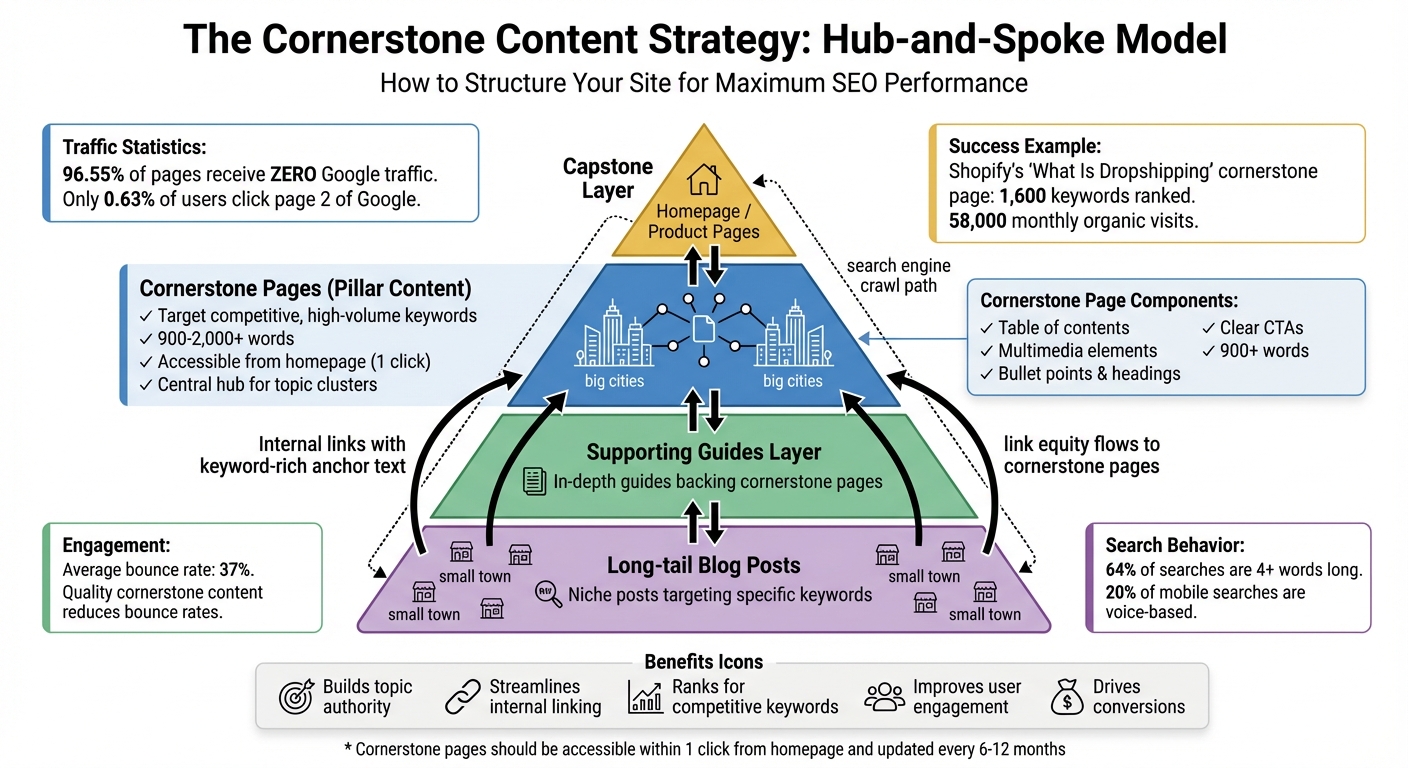
Your infographic should bring the Content Pyramid Model to life by showcasing its four layers:
- The Capstone layer: This includes your homepage or product pages.
- The Cornerstone content layer: The main pillars of your content.
- The Supporting guides layer: In-depth guides that back up your cornerstone pages.
- The Long-tail blog posts layer: Niche posts targeting specific keywords.
Use different colors or shapes to visually separate pillar topics from cluster posts. Highlight essential elements like keyword-rich headlines, tables of contents, multimedia, bullet points, and clear calls-to-action (CTAs). Add bidirectional arrows to show how pillar pages link to cluster posts and vice versa.
For a creative touch, represent cornerstone pages as “big cities” with multiple connecting links, while cluster posts can be “small towns” with fewer links. Make sure your infographic emphasizes that cornerstone pages are easy to access from the homepage or main navigation. You can also include data highlights to show the value of this structure for U.S. businesses.
Data Highlights For U.S. Businesses
Incorporate callout boxes with key U.S. statistics to emphasize the benefits of strong cornerstone content. For example:
- Only 0.63% of users click on results from the second page of Google.
- A staggering 96.55% of pages receive zero Google traffic.
- The average website bounce rate hovers around 37%, but high-quality cornerstone content can help lower this by creating a better user experience.
Add real-world examples to drive the point home. For instance, in June 2024, Shopify’s cornerstone page, “What Is Dropshipping and How Does It Work”, ranked for 1,600 keywords and brought in an average of 58,000 organic visits per month. Sharing these kinds of success metrics can help U.S. businesses see the direct benefits of a robust cornerstone content strategy.
Conclusion
Cornerstone pages are the backbone of a strong SEO strategy, laying the groundwork for long-term authority and visibility. By crafting in-depth, well-researched resources targeting competitive keywords, you not only demonstrate your expertise to search engines but also provide visitors with exactly what they’re looking for.
The numbers highlight how essential it is to have a solid SEO strategy. Start by identifying 3–5 key topics that align with your business’s strengths. Develop detailed pages – aiming for over 2,000 words – and support them with related cluster content that links back to these main pages. Make sure your cornerstone pages are easy to navigate, include tables of contents, and are updated regularly to stay relevant.
FAQs
What makes cornerstone pages different from regular blog posts?
Cornerstone pages serve as in-depth, evergreen resources that thoroughly explore a central topic. These pages are typically lengthy, often covering multiple subtopics, and act as a hub for related content. They play a crucial role in your site’s internal linking strategy, providing a foundation for exploring broader themes.
On the other hand, regular blog posts are shorter and more narrowly focused. These posts often target specific long-tail keywords or niche questions, complementing cornerstone pages by linking back to them. This setup not only helps search engines recognize the cornerstone page as the main authority on the subject but also creates a clear and organized path for users to dive deeper into related content.
What is the hub-and-spoke model in content strategy, and how does it work?
The hub-and-spoke model is a content strategy that revolves around a central, comprehensive “hub” page that addresses a broad topic. Surrounding this hub are smaller, more focused “spoke” pages, each diving into specific subtopics related to the main theme. These spokes link back to the hub, while the hub connects to each spoke, forming a well-organized internal linking structure.
This setup not only helps search engines grasp the connections between your pages, boosting rankings for both the hub and spokes, but also improves the reader’s experience. It guides users seamlessly from general overviews to detailed insights, keeping them engaged and encouraging deeper exploration of the topic.
How frequently should I update cornerstone pages to maintain strong SEO performance?
Keeping cornerstone pages up-to-date is key to ensuring they stay relevant, accurate, and search-engine friendly. While there’s no one-size-fits-all rule for how often to update them, a solid approach is to review these pages every 3–6 months. This gives you the chance to update outdated details, add in new keywords, and adjust to any shifts in your industry or audience preferences.
Consistently refreshing these pages doesn’t just enhance the experience for your readers – it also sends a clear signal to search engines that your content is current and worthwhile, which can help boost your rankings.