
Search Has Changed. Here’s What You Need to Know About AI Driven Search
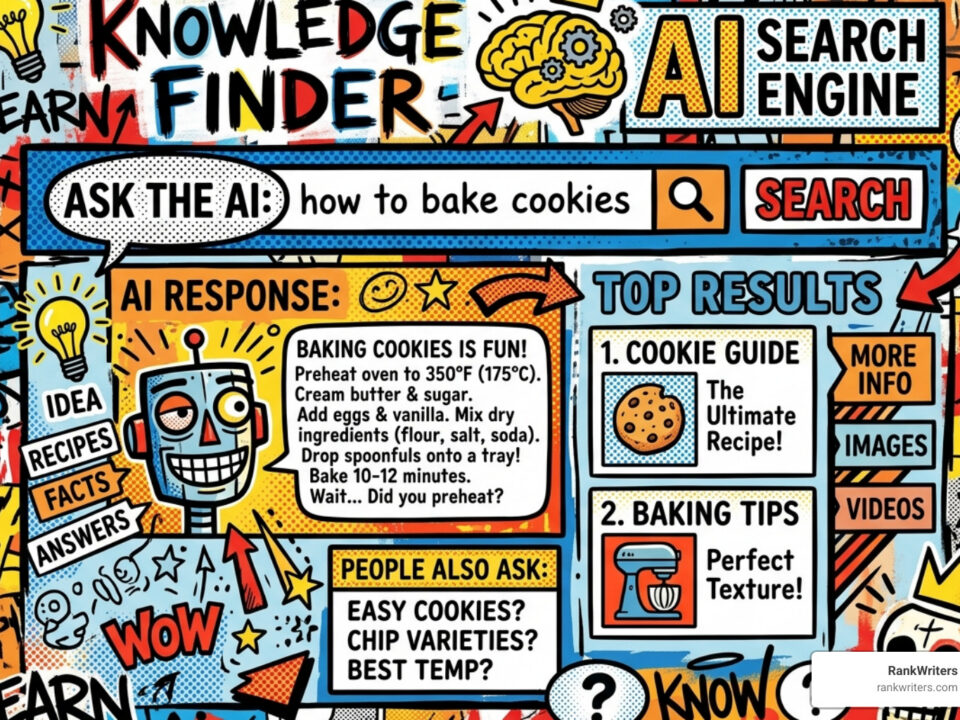
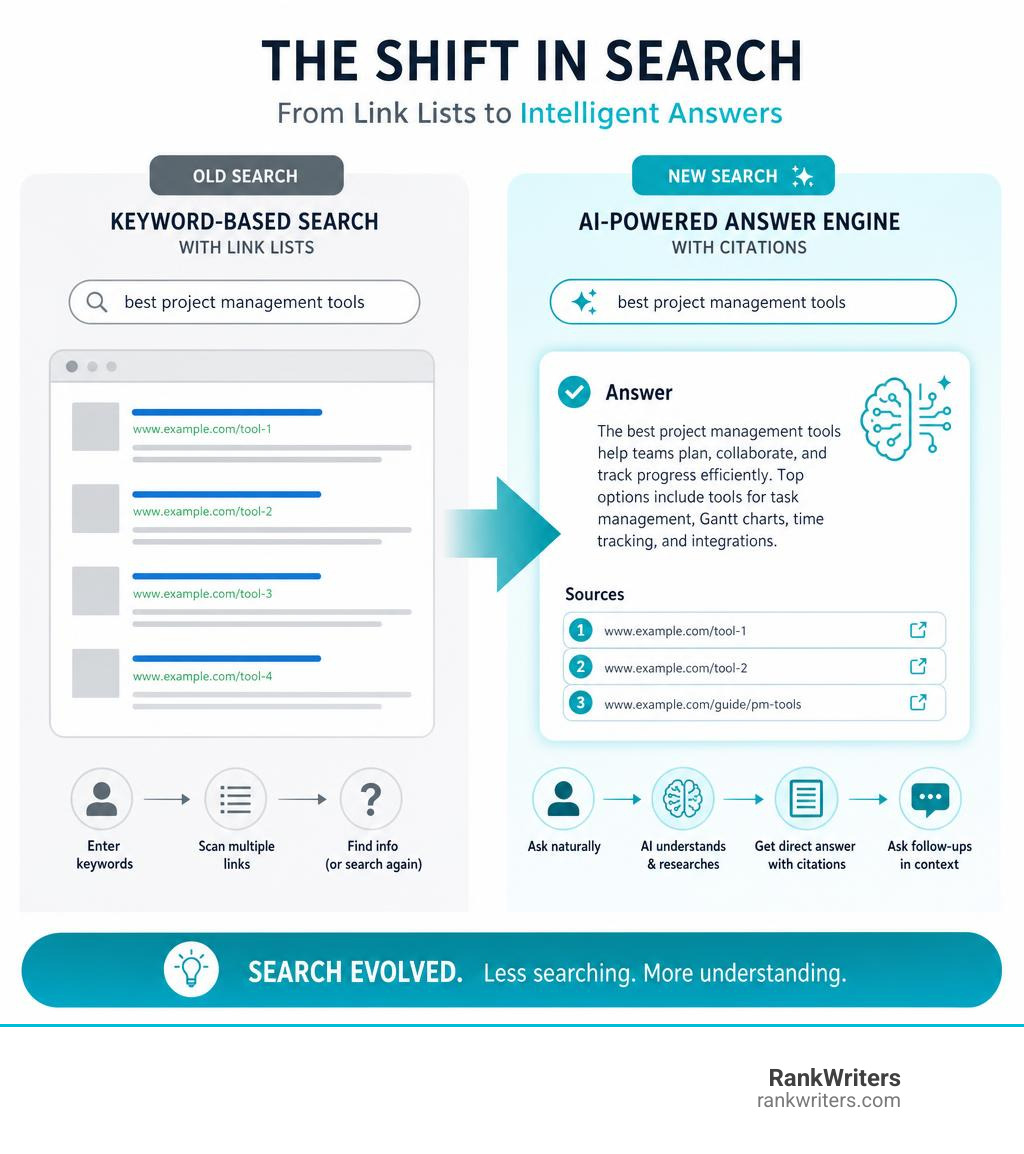
An AI driven search engine is a search tool that uses artificial intelligence to understand what you’re actually asking, then delivers a direct answer instead of a list of links.
Here’s a quick breakdown of what that means:
| Feature | Traditional Search | AI Driven Search |
|---|---|---|
| How it works | Matches keywords to pages | Understands meaning and intent |
| What you get | List of ranked links | Synthesized, conversational answer |
| Follow-up questions | Start a new search | Continue the same conversation |
| Source transparency | Links are the sources | Citations vary by tool |
| Best for | Browsing options | Getting direct answers fast |
Search used to mean typing a few keywords and clicking through ten blue links. That model is rapidly being replaced.
Tools powered by large language models (LLMs) now read your question, pull information from across the web, and write you a direct answer. Google’s AI Overviews alone now reach 2 billion users every month. The Gemini app surpasses 650 million monthly users.
This is not a small shift. It is a fundamental change in how people find information, evaluate software, make buying decisions, and discover businesses like yours.
If your content is not showing up in these AI-generated answers, you are already losing visibility to competitors who are.
Ai driven search engine terms you need:
What Is an AI Driven Search Engine and Why Search Now Feels Conversational
An AI driven search engine uses machine learning, natural language processing, semantic search, and large language models to understand a query the way a person might ask it.
Instead of matching only the words in a search box, it looks at:
- The meaning behind the question
- The likely intent of the user
- Related entities, products, people, and concepts
- The context from previous questions
- Current or retrieved web information
- The best way to summarize an answer
That is why modern search feels more like asking a knowledgeable assistant than using a directory.
A traditional search engine might respond to “best CRM for small mortgage lenders” with ranked links. An AI search experience may summarize several CRM options, explain tradeoffs, compare features, cite sources, and suggest what to check next.
That is useful. It is also risky if the answer is wrong, outdated, biased, or missing sources. A confident robot is still a robot. Sometimes it wears a nice blazer and invents things.
How an AI Driven Search Engine Differs From Traditional Search
Traditional search engines rank pages using signals such as keyword relevance, backlinks, site authority, freshness, page experience, and technical quality. They are excellent at helping users browse sources.
AI search engines go further by generating answers.
The main difference is not just the interface. It is the job being performed.
| Search Task | Traditional Search | AI Driven Search |
|---|---|---|
| Query handling | Interprets keywords | Interprets meaning, context, and intent |
| Results | Ranked URLs | Summaries, recommendations, citations |
| Follow-up | Usually requires a new query | Continues in the same thread |
| Research style | User compares sources manually | AI synthesizes sources first |
| Risk | User may choose poor sources | AI may summarize poor sources confidently |
For simple searches, traditional search is still very strong. If someone needs a company website, a recent press release, a local address, or official pricing, direct search may be faster and safer.
For complex questions, AI search shines. It can handle queries such as:
- “Compare three project management tools for a 20-person remote software team.”
- “Summarize the difference between RAG and fine-tuning for a nontechnical buyer.”
- “Create a checklist for evaluating marketing automation software.”
For Your Money or Your Life topics, including financial, legal, medical, or lending-related decisions, AI answers should be treated as a starting point, not the final authority. Verification still matters.
How LLMs, NLP, and RAG Turn Queries Into Answers
AI search engines usually combine three core technologies.
First, natural language processing helps the system understand normal human phrasing. Users no longer have to type stiff keyword strings like “CRM software small business pricing comparison.” They can ask, “Which CRM is best for a small team that needs automation but not a huge setup project?”
Second, large language models generate readable answers. The LLM predicts and writes language based on the query, context, and retrieved information.
Third, retrieval-augmented generation, often called RAG, connects the model to external sources. Instead of relying only on training data, the system retrieves current documents, chunks, pages, or database entries, then uses them to ground the answer.
A simplified RAG process looks like this:
- The user asks a question.
- The system expands or rewrites the query.
- It searches an index, database, or live web source.
- It retrieves relevant passages.
- The LLM summarizes those passages.
- The answer includes citations if the product supports them.
Query expansion is a major part of this process. AI platforms may “fan out” one user query into several related searches to capture more context. For mortgage lenders, RankWriters explains this in more detail here: how AI search platforms expand queries with fan-out.
How AI Search Engines Work Behind the Scenes
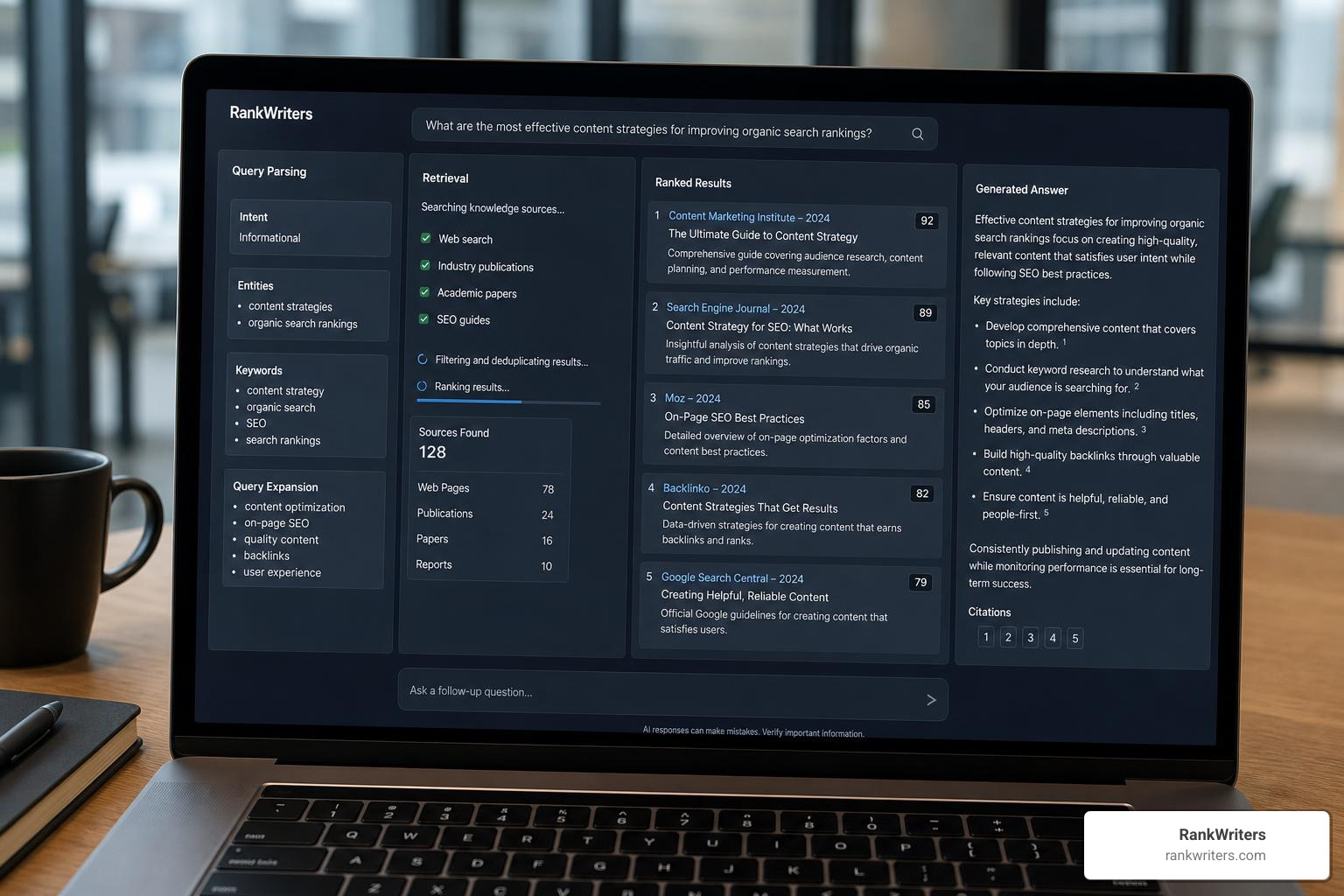
Behind every polished AI answer is a pipeline. It may look magical on the front end, but there is a lot happening in the machinery.
A typical AI search system may include:
- Query parsing
- Entity extraction
- Semantic indexing
- Web crawling
- API-based retrieval
- Vector embeddings
- Ranking models
- RAG pipelines
- Citation selection
- Freshness checks
- Confidence scoring
- Privacy and security controls
Some newer search infrastructure is built specifically for AI agents, not just human users. For example, Exa positions its technology around semantic search, crawling, and retrieval for AI applications. Its web search API is designed to return web data that AI systems can use for research, summarization, and agentic workflows.
That agentic layer matters because AI search is moving beyond “answer this question.” The next version is closer to “research this, compare options, fill in the spreadsheet, and tell the team what to do next.”
From Search Index to Answer Engine
A search index is a giant map of web content. Traditional search engines crawl pages, store information, and rank results. AI search engines often use that same foundation, then add semantic retrieval and answer generation.
The process often includes:
- Crawling pages and storing page content
- Breaking pages into smaller chunks
- Creating embeddings that represent meaning
- Matching query embeddings to content embeddings
- Retrieving relevant passages
- Ranking sources for quality and relevance
- Generating a natural language response
- Adding citations or links where available
Some tools rely on their own index. Others use third-party indexes, APIs, or a mix of sources. Brave Search, for example, emphasizes its independent index and privacy-first approach. Kagi focuses on paid, user-controlled search with AI features and customizable search lenses through Kagi Search.
For businesses, the lesson is simple: content must be crawlable, clear, and structured. If an AI system cannot access or understand the page, it is much less likely to cite it.
That makes technical basics more important, not less:
- Clean site architecture
- Fast loading pages
- Schema markup
- Clear headings
- Descriptive titles
- Crawl access through robots.txt
- Updated content
- Strong internal linking
- Entity consistency across the web
Why Source Citation, Transparency, and Accuracy Matter
Source citations are not decoration. They are the seatbelt.
When AI search is used for software buying, citations help teams verify:
- Whether a feature claim is current
- Whether pricing is official or outdated
- Whether a comparison is based on real sources
- Whether the answer overstates a vendor’s capabilities
- Whether the tool misunderstood the question
- Whether a recommendation is biased
This matters even more in business decisions where procurement, compliance, data privacy, and implementation costs are involved.
For example, if an AI search engine recommends a software platform but cites an old blog post, a broken URL, or a third-party page with outdated pricing, the buyer can make a costly mistake. In software purchasing, a wrong assumption can become a six-month contract. That is not a typo, that is a budget meeting.
Mortgage lenders should pay special attention to how AI tools interpret intent, because AI systems can reshape or narrow a query before answering it. RankWriters covers this issue for mortgage lenders in how AI search platforms skew intent.
Comparing Major AI Search Experiences for Software Research
AI search tools are not all built for the same job. Some are better for fast summaries. Some are better for citations, technical depth, privacy, or structured business reporting.
Here is a practical comparison for software research in 2026.
| AI Search Experience | Citations | Freshness | Readability | Follow-up Support | Privacy / Controls | Software Research Fit |
|---|---|---|---|---|---|---|
| Perplexity | Strong, visible citations | Strong for web research | Clean and concise | Excellent | Team and enterprise options available | Excellent for fast research and comparisons |
| ChatGPT with browsing/search | Varies by mode and source | Good when web access is used | Very strong | Excellent | Business and enterprise controls available | Strong for synthesis, prompts, and planning |
| Microsoft Copilot | Usually provides links and sources | Strong for web-connected tasks | Very strong formatting | Good | Strong Microsoft ecosystem fit | Strong for structured business summaries |
| Google Gemini / AI Mode | Strong Google ecosystem access | Strong when connected to Search | Good, improving fast | Good | Google account and workspace controls vary | Strong for Google-related research and broad discovery |
| Claude with search/retrieval features | Source support varies by plan and context | Good when connected to current sources | Excellent long-form clarity | Excellent | Strong business controls in paid tiers | Strong for deep analysis and technical explanation |
| Grok | Often broad source discovery | Strong for current web and social context | Conversational | Good | Platform-dependent | Useful for trend and real-time context checks |
| Brave Search | Cited AI answers plus traditional search | Good | Simple | Limited compared with chat-first tools | Strong privacy positioning | Good when users want AI plus classic results |
| Consensus | Academic citations | Strong for research literature | Focused | Limited by academic scope | Research-focused | Best for scientific and academic evidence |
| Komo | Varies | Good for general web | Simple | Good | Model and source options vary | Useful for quick comparisons and source control |
No single tool wins every task. The best choice depends on the work being done.
Best Fit for Fast Software Shortlists
For fast software shortlists, look for web retrieval, citations, follow-up questions, and comparison formatting.
A good AI search workflow can produce:
- A shortlist of vendors
- Feature comparisons
- Pricing notes
- Implementation considerations
- Pros and cons
- Questions to ask sales teams
- Risks to verify
Perplexity is often strong in this category because it can search, summarize, cite, and refine quickly. ChatGPT can also perform well when connected to current web sources, especially when the user provides clear buying criteria.
A better prompt is:
“Compare five CRM platforms for a 25-person B2B company. Prioritize ease of implementation, email automation, reporting, integrations, pricing transparency, and support quality. Include citations and a table.”
Specificity makes the answer more useful.
Best Fit for Readability and Structured Comparisons
Some tools are especially helpful when research needs to be shared with a team.
Look for:
- Clear tables
- Short executive summaries
- Pros and cons
- Decision matrices
- Risk sections
- Source links
- Export-friendly formatting
Microsoft Copilot is often useful for business-readable formatting, especially for teams already working inside Microsoft tools. ChatGPT and Claude are also strong for turning messy research into polished summaries.
This matters because software decisions often involve marketing, operations, IT, finance, and executive stakeholders.
Best Fit for Deep Technical or Academic Research
For deeper research, the best tool depends on the source type.
For academic or scientific questions, Consensus is built around research papers and evidence summaries. For developer documentation, coding questions, implementation planning, and technical explanations, ChatGPT, Claude, Gemini, and specialized search APIs can all be useful depending on access and configuration.
For AI builders, tools like Exa Search are relevant because they focus on retrieval for agents and applications rather than only a human-facing search box. Exa’s research describes semantic search as meaning-based retrieval, which is useful for long, specific queries that traditional keyword systems may not handle as well. Its launch announcement, Announcing Exa, explains the shift from keyword matching toward transformer-based semantic search.
For deep work, users should ask:
- Are the sources primary or secondary?
- Are citations current?
- Are technical claims supported?
- Does the answer distinguish facts from assumptions?
- Can the tool retrieve official documentation?
- Does it explain uncertainty?
If not, the answer may be useful as a draft, but not as a decision record.
How to Choose an AI Driven Search Engine for Business Workflows
The right AI driven search engine depends on the workflow.
Businesses should evaluate tools based on:
- Citation quality
- Freshness of results
- Privacy policy
- Enterprise controls
- Team sharing features
- Integrations
- API access
- Cost
- Model choice
- Export options
- Auditability
- Industry fit
- Ease of adoption
A solo researcher may prioritize speed. A software buyer may prioritize citations. A regulated business may prioritize privacy and audit trails. A content team may prioritize query discovery and answer visibility.
Mortgage lenders evaluating AI search workflows can use RankWriters’ guide to AI search tools for mortgage lender visibility and research as a next step.
Benefits and Limits of AI Search in 2026

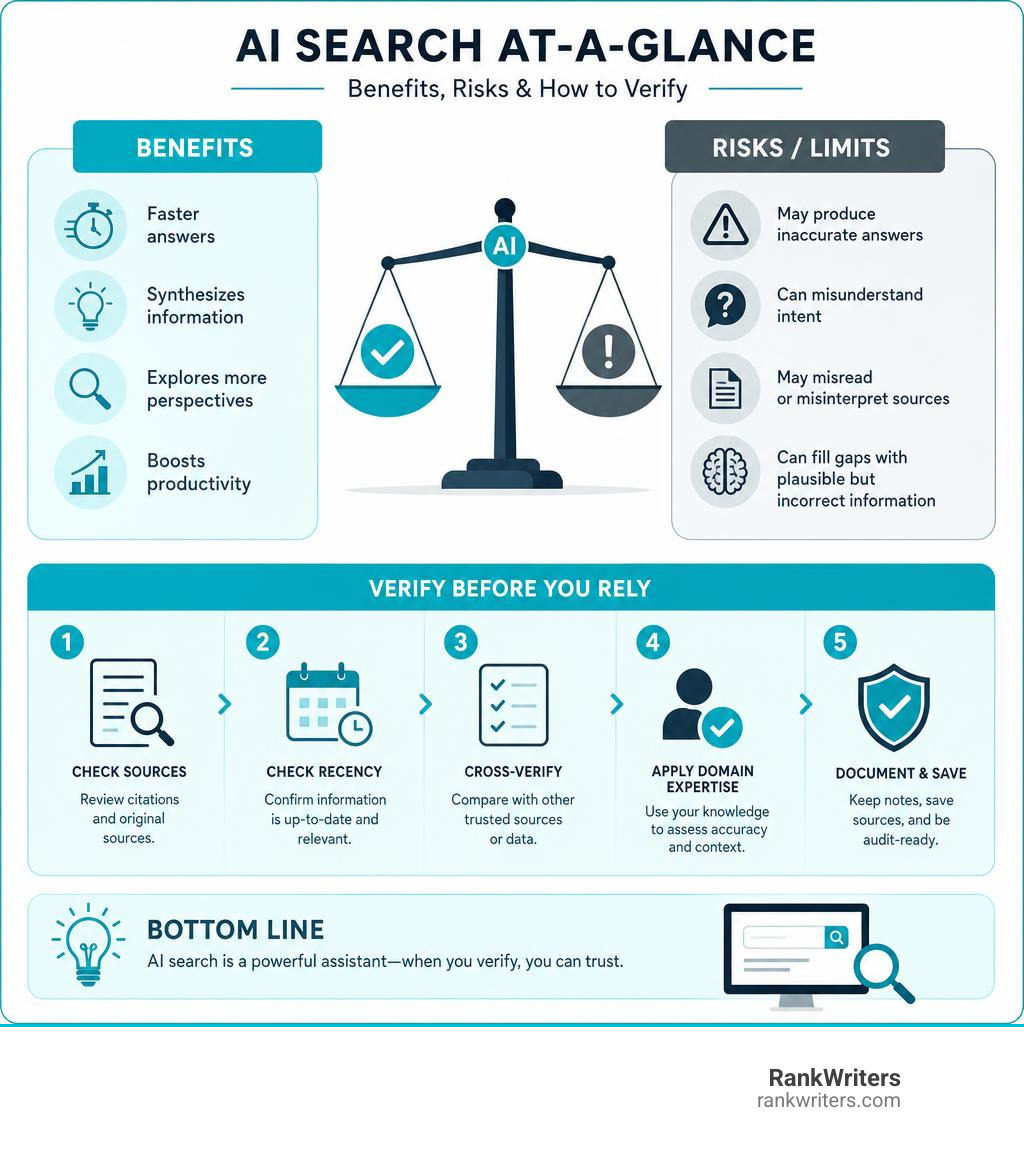
AI search is powerful because it reduces the friction between question and answer. It is limited because it can still misunderstand the question, misread sources, or fill gaps with plausible nonsense.
Both things are true.
Where AI Search Helps Most
AI search is especially useful for tasks that require synthesis.
Examples include:
- Software comparisons
- Competitive research
- Buying guides
- Executive summaries
- FAQ discovery
- Market research
- Technical troubleshooting
- Content planning
- Source summaries
- Next-step recommendations
- Vendor evaluation questions
- Internal knowledge search
It is also helpful for complex queries. Traditional search often works best when the user knows which keywords to use. AI search works better when the user knows the problem but not the perfect search phrase.
For example:
“Find tools that help a small lending team manage borrower communication, appointment reminders, and lead follow-up without adding a complicated enterprise CRM.”
That kind of query is natural, detailed, and intent-rich. AI search is built for it.
Where AI Search Still Fails
AI search still has real limitations.
The biggest risks are:
- Hallucinated claims
- Missing citations
- Weak source transparency
- Outdated data
- Misread pages
- Broken URLs
- Biased source selection
- Overconfident summaries
- Poor local nuance
- Privacy concerns
- Thin attribution to original publishers
Some tools also struggle with interface friction. They may provide a beautiful answer but make it hard to inspect sources. Others cite many sources but do not clearly show which source supports which claim.
AI search can also flatten nuance. A tool may summarize a complex product category into a neat table, but important implementation differences can disappear. The table looks tidy. The truth is messier. Software buyers should assume the tidy table is a starting point.
What AI Search Means for SEO, AEO, and GEO
AI search changes what visibility means.
Traditional SEO focuses on ranking pages in search results. AEO, or answer engine optimization, focuses on being the answer to specific questions. GEO, or generative engine optimization, focuses on being cited, summarized, or recommended by AI systems.
The future is not SEO versus AI. It is SEO plus AEO plus GEO.
Content needs to be:
- Clear enough for humans
- Structured enough for search engines
- Specific enough for AI retrieval
- Original enough to add information gain
- Trustworthy enough to be cited
- Fresh enough to remain accurate
For mortgage lenders, RankWriters explains the concept in what GEO means for AI search visibility.
Strong AI-visible content often includes:
- Direct answers near the top
- Short paragraphs
- Descriptive headings
- Schema markup
- Clear author or expert review signals
- Original examples or data
- Comparison tables
- FAQs
- Updated publication dates
- Consistent brand and entity information
AI search rewards clarity. It does not enjoy digging through vague marketing fog. Honestly, neither do humans.
How Businesses and Users Can Get Started Today
Getting started with AI search does not require a massive transformation project. It requires a practical workflow.
Businesses can begin by identifying where search already slows the team down:
- Software research
- Competitive analysis
- Content planning
- Sales enablement
- Customer FAQs
- Internal documentation
- Market research
- Technical troubleshooting
Then they can test two or three tools against the same real tasks.
Do not test with toy questions like “What is marketing?” Use actual work.
A Practical Evaluation Checklist
Use this checklist before adopting an AI search tool:
Accuracy test
- Ask questions where the team already knows the correct answer.
- Compare the AI answer with trusted sources.
Source test
- Check whether citations are clickable.
- Confirm that sources support the claims being made.
Freshness test
- Ask about recent software updates, pricing, or product changes.
- Verify against official vendor pages.
Privacy test
- Review what data is stored.
- Avoid entering confidential information unless the tool is approved for that use.
Interface test
- Check whether the team can easily ask follow-ups.
- Review whether answers can be copied, exported, or shared.
Cost test
- Compare free, pro, team, and enterprise plans.
- Consider usage limits and admin controls.
Integration test
- Check whether the tool works with existing systems.
- Consider browser extensions, document tools, APIs, or workspace integrations.
Repeatability test
- Create prompt templates.
- See whether the tool produces consistent results.
Human review test
- Assign a person to validate key outputs.
- Do not automate important decisions without review.
Auditability test
- Save sources, prompts, assumptions, and final recommendations.
A Safer Workflow for Software Purchasing Decisions
AI search is very useful for software purchasing, but it should not replace due diligence.
A safer workflow looks like this:
- Define requirements before searching.
- Ask the AI tool for a shortlist.
- Request a comparison table with citations.
- Verify each vendor’s official website.
- Check current pricing and plan limits.
- Review recent customer feedback from trusted sources.
- Ask the AI tool to identify risks and unknowns.
- Run the same query in another AI search tool.
- Document assumptions.
- Involve IT, finance, compliance, and end users before deciding.
The key rule: never make a software purchase from one AI answer.
Use AI search to speed up the research. Use human judgment to make the decision.
How Content Creators Can Stay Visible
Content creators need to write for both people and machines. That does not mean writing robotic content. It means making helpful information easy to extract, verify, and cite.
AI-friendly content should include:
- Direct answers
- Clear headings
- Short paragraphs
- Schema markup
- Expert authorship
- Original data or examples
- Clear comparisons
- Updated pages
- Crawlable HTML text
- Consistent entity information
- Helpful FAQs
- Internal links to related resources
Mortgage lenders can review RankWriters’ guidance on formatting content for AI search visibility to understand how structure affects retrieval.
The content that wins in AI search will usually do three things well:
- Answer the question directly.
- Prove the answer with useful detail.
- Make the source easy to trust.
That is not a gimmick. It is good publishing.
Frequently Asked Questions About AI Driven Search Engines
What is an AI search engine?
An AI search engine is a search tool that uses artificial intelligence to understand natural language questions and generate direct answers. It may use LLMs, NLP, semantic search, vector embeddings, and RAG to retrieve information and summarize it conversationally.
Instead of only returning a list of links, it may provide:
- A direct answer
- A source summary
- Follow-up questions
- Citations
- Comparisons
- Recommendations
- Next steps
The best AI search engines help users move from “Where should I look?” to “What does the evidence say?”
Are AI search engines better than traditional search engines?
Sometimes. Not always.
AI search engines are often better for:
- Complex questions
- Summaries
- Comparisons
- Brainstorming
- Research planning
- Follow-up exploration
- Turning many sources into one readable answer
Traditional search engines are often better for:
- Finding official websites
- Checking current facts
- Browsing multiple sources manually
- Local searches
- Sensitive YMYL topics
- Verifying exact source material
The smartest workflow uses both. AI search can summarize and guide. Traditional search can verify and deepen.
How should businesses choose the right AI search tool?
Businesses should choose based on workflow, not hype.
They should evaluate:
- Does it cite sources clearly?
- Are results current?
- Can the team verify claims?
- Does it protect sensitive data?
- Does it integrate with existing tools?
- Is the interface easy to use?
- Does it support repeatable research workflows?
- Can outputs be shared or exported?
- Does the cost make sense?
- Does it fit the team’s industry and risk level?
For software research, citation quality and freshness should be near the top of the list. A beautiful answer with weak sourcing is just a well-dressed guess.
Conclusion
AI search is not a passing trend. It is the next layer of how people discover, compare, and decide.
Traditional search is not disappearing, but it is evolving. Search engines are becoming answer engines. AI Overviews, AI Mode, conversational search, semantic retrieval, and RAG-powered tools are reshaping how users move from question to decision.
For businesses, this creates a new visibility challenge. Ranking on page one is still valuable, but it is no longer the whole game. Brands also need to appear in AI-generated answers, cited summaries, comparison tables, and recommendation workflows.
That requires a future-proof strategy that combines:
- Traditional SEO
- Answer engine optimization
- Generative engine optimization
- Clear content structure
- Entity authority
- Fresh, useful information
- Strong source credibility
RankWriters helps businesses create SEO content designed for Google, AI Search, AEO, and GEO so they can generate consistent inbound leads as search behavior changes.
The next era of search belongs to businesses that are easy for both humans and AI systems to understand.
Start here: run an AI search visibility audit.